Quick answer
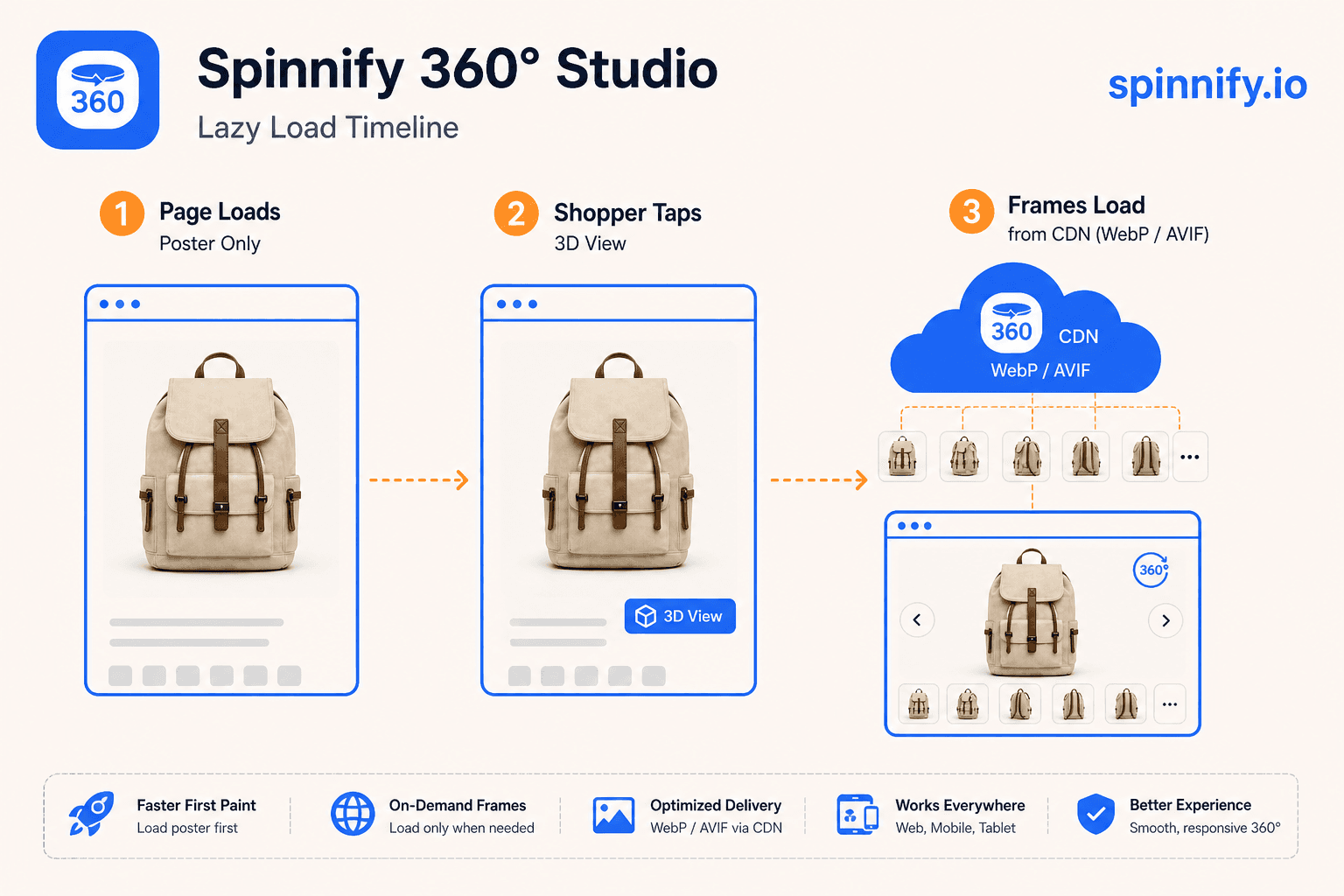
Lazy loading a 360 product widget means the product page paints a static poster first, then loads player JavaScript and spin frames after the shopper taps or scrolls the block into view. That pattern is lazy loading images for a multi-frame 360 product viewer: it protects Largest Contentful Paint and keeps the hero gallery as the LCP candidate. Spinnify 360° Studio publishes WebP and AVIF frames on Spinnify CDN with open-on-interaction behavior by default. Avoid eager-loading every frame on document load.
Heavy 360 embeds fail PageSpeed audits for a predictable reason: they treat thirty-six images like one giant hero. Merchants then remove the spin entirely and lose inspection value. Lazy loading images on the product page fixes the tradeoff when you separate poster paint from frame fetch.
This how-to applies to any storefront, with Spinnify as the reference implementation. Spinnify is a full capture-to-widget service, not a panorama stitcher. Plan pricing is on spinnify.io/pricing.
Why lazy load beats eager spin embeds
Eager embeds download the player, prefetch loops, and sometimes analytics before the shopper touches the gallery. On mobile that competes with your product hero for bandwidth and main-thread time. Lazy load defers non-critical bytes until intent is clear.
| Pattern | LCP impact | Shopper experience |
|---|---|---|
| Eager full spin | High risk: many images compete with hero | Instant spin, slow first paint |
| Poster + tap to open | Low risk: hero stays LCP | One tap, then smooth drag |
| Intersection lazy load | Medium: loads when scrolled near | Good for below-fold spins |
| CDN WebP / AVIF | Smaller bytes per frame | Same drag feel, less data |
Lazy loading images on product pages
Treat the spin as a stack of images, not one media file. Lazy loading images means the browser paints the poster, then fetches frame N only after tap or intersection. Never block first paint with a zip of thirty-six JPEGs on the shop origin. Prefer Spinnify CDN WebP and AVIF so each frame is small once the shopper opens the 360 product viewer.
Core Web Vitals and LCP for 360 widgets
Core Web Vitals on a PDP usually fail when LCP is a late-loading spin frame instead of the static hero. Keep Largest Contentful Paint on the poster. Tap-to-open also limits INP risk from heavy script work during first interaction. After deploy, verify Core Web Vitals on staging with the same theme and SKU you ship.
Universal checklist
Keep widget.js async or defer. Never block render with spin assets. Map one poster per SKU. Prefetch at most the first frame after tap, not the whole loop. Serve modern formats from CDN rather than oversized JPEG stacks on the shop origin.
Publish a lazy spin in minutes: Open Spinnify 360° Studio. See also Shopify 360 spin page speed and Spinnify pricing.