Quick answer
360 spin video for ecommerce usually means a looping clip of a product turning on a turntable. An interactive 360° spin is different: shoppers drag the view themselves from a sequence of still frames. Spinnify sits on the second path. You can still start from a short rotation video in Spinnify 360° Studio; the service extracts 36 frames and serves a lazy-loaded widget on the product page instead of forcing an autoplay MP4.
Search for “360 spin video for ecommerce” and you will see studio reels, AI generators, and interactive viewers mixed together. Merchants often buy the wrong deliverable because the labels sound identical. A smooth autoplay loop looks impressive in a pitch deck. On a product detail page it can burn Largest Contentful Paint and still leave the shopper unable to pause on the hinge, the sole, or the back of a clasp.
This article sorts the formats, explains when a video loop earns its keep, and shows how catalog teams turn an existing turntable clip into an interactive spin without a second full shoot. If you already have the file and only need the upload steps, use the short companion guide linked later.
What is 360 spin video for ecommerce?
In production language, a 360 spin video is a continuous recording of a product rotating a full turn on a platform, edited into a continuous loop. The camera stays fixed. The product moves. The finished file is a normal video (often MP4) that plays on the product page, in ads, or on marketplaces that accept video assets.
That format solves a real problem: online shoppers cannot pick the item up. A rotation shows silhouette, proportions, and finish in one motion. Jewelry, footwear, bottles, electronics, and small appliances benefit most because shape and craftsmanship carry the purchase decision.
Teams also use the phrase for 360 spin images: still frames captured every few degrees and stitched into a viewer. Same commercial goal, different file type and different shopper control. Confusing the two is how budgets get spent twice.
Spin video vs 360 photo viewer vs stop-motion
Treat these as three tools, not three brand names for the same asset. The table below is the decision filter we use when a merchant asks which format to commission.
| Format | What the shopper gets | Best when |
|---|---|---|
| 360 spin video (loop) | Autoplay rotation; little or no drag control | Ads, social, marketplaces that want a video file |
| Interactive 360 photo spin | Drag or swipe through still frames; pause on detail | PDP inspection, returns-sensitive categories |
| Stop-motion / demo video | Story or mechanism, not a pure orbit | Products that open, assemble, or change state |
Interactive spins usually load as compressed WebP or AVIF frames from a CDN after the shopper taps a control. Autoplay video competes with your gallery for bandwidth and often becomes the largest paint candidate. If Core Web Vitals matter on the PDP, prefer a lazy interactive viewer and keep the loop for channels that reward video.
Why stores invest in 360 spin video
Static packshots leave gaps. Shoppers invent what the back looks like, then return the item when reality differs. Industry surveys such as NRF regularly put online return rates near one in five orders; interactive multi-angle views are one of the few merchandising levers that attack visual uncertainty directly. We do not claim a universal conversion lift. Your category, creative quality, and traffic intent decide the size of the effect.
360 spin images for ecommerce add a second benefit on the product page: the shopper chooses the pace. That mimics the in-store habit of turning an object in hand. A looping video can still help discovery and social proof, especially when the channel will not host an interactive player.
How teams produce 360 product video
There is no single correct pipeline. Budget, SKU volume, and whether you already own a rotation clip decide the path.
Dedicated studio or agency
Motorized turntables, controlled light, and retouching produce the cleanest loops and frame sets. Cost scales with reflective surfaces, transparent parts, and rush timelines. Volume sessions lower the per-SKU price. This path fits premium jewelry and campaigns where every highlight must be perfect.
In-house turntable and DIY capture
A fixed camera, soft light, and a steady turntable (even a phone on a tripod) are enough for many mid-market catalogs. Shoot either a continuous video pass or a timed still series. Keep the background neutral and the product centered so post-production stays light. Warehouse corners with a repeating setup beat one-off living-room shoots for consistency.
AI generators from still photos
Tools that invent a spin from one to three reference images can fill gaps when you lack a physical shoot. Quality tracks the lighting and coverage of those stills. Spinnify offers an AI Spin path in Spinnify 360° Studio for that case; see 360° without a photo studio for the limits and workflow.
Reuse a clip you already filmed
Many teams already have a clean turntable reel from a previous agency job or a phone shoot. Exporting thirty-six JPEGs by hand is where projects stall. That is the gap Spinnify closes on the interactive path: keep the clip, extract frames, publish the widget.
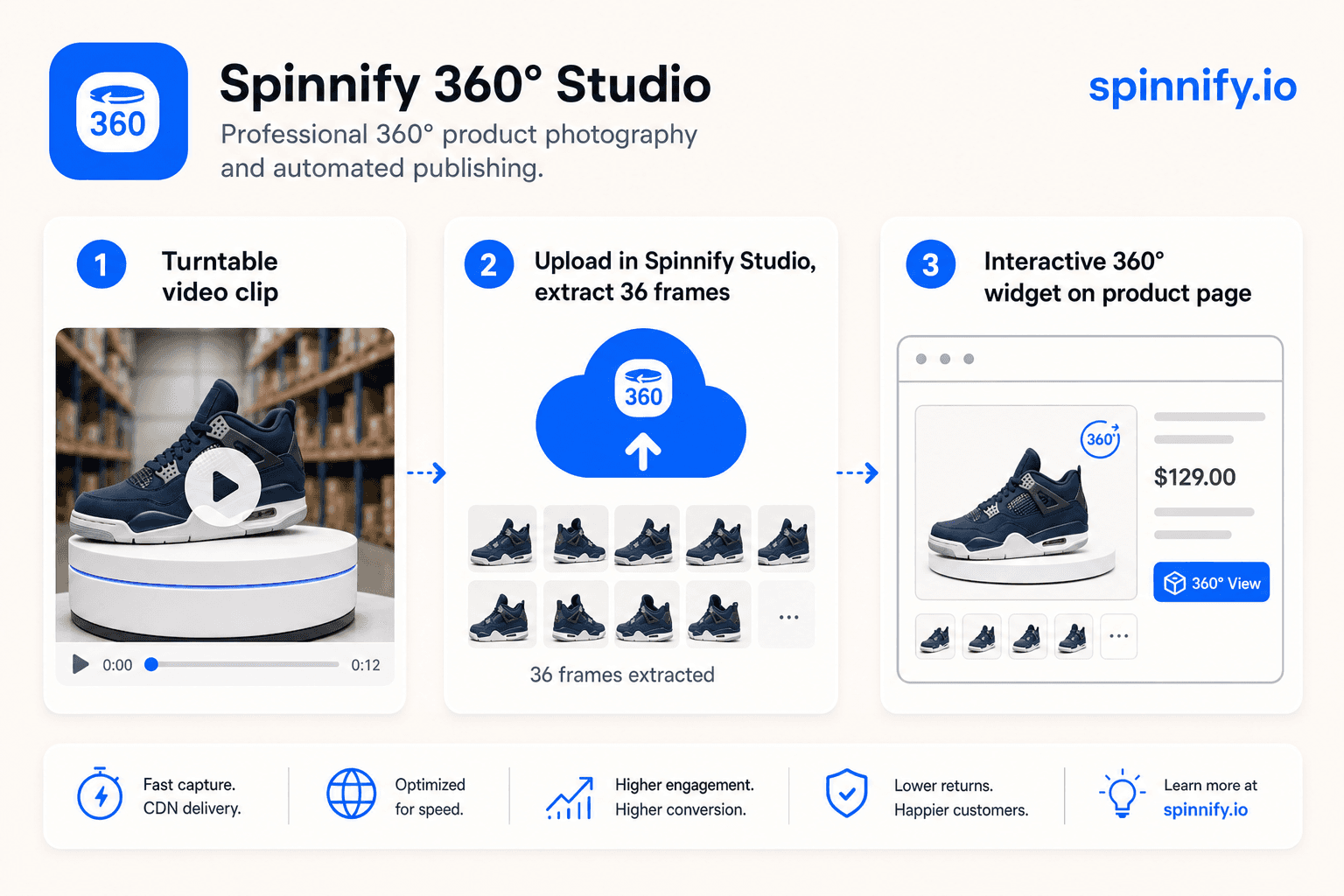
The Spinnify path: turntable video to interactive spin
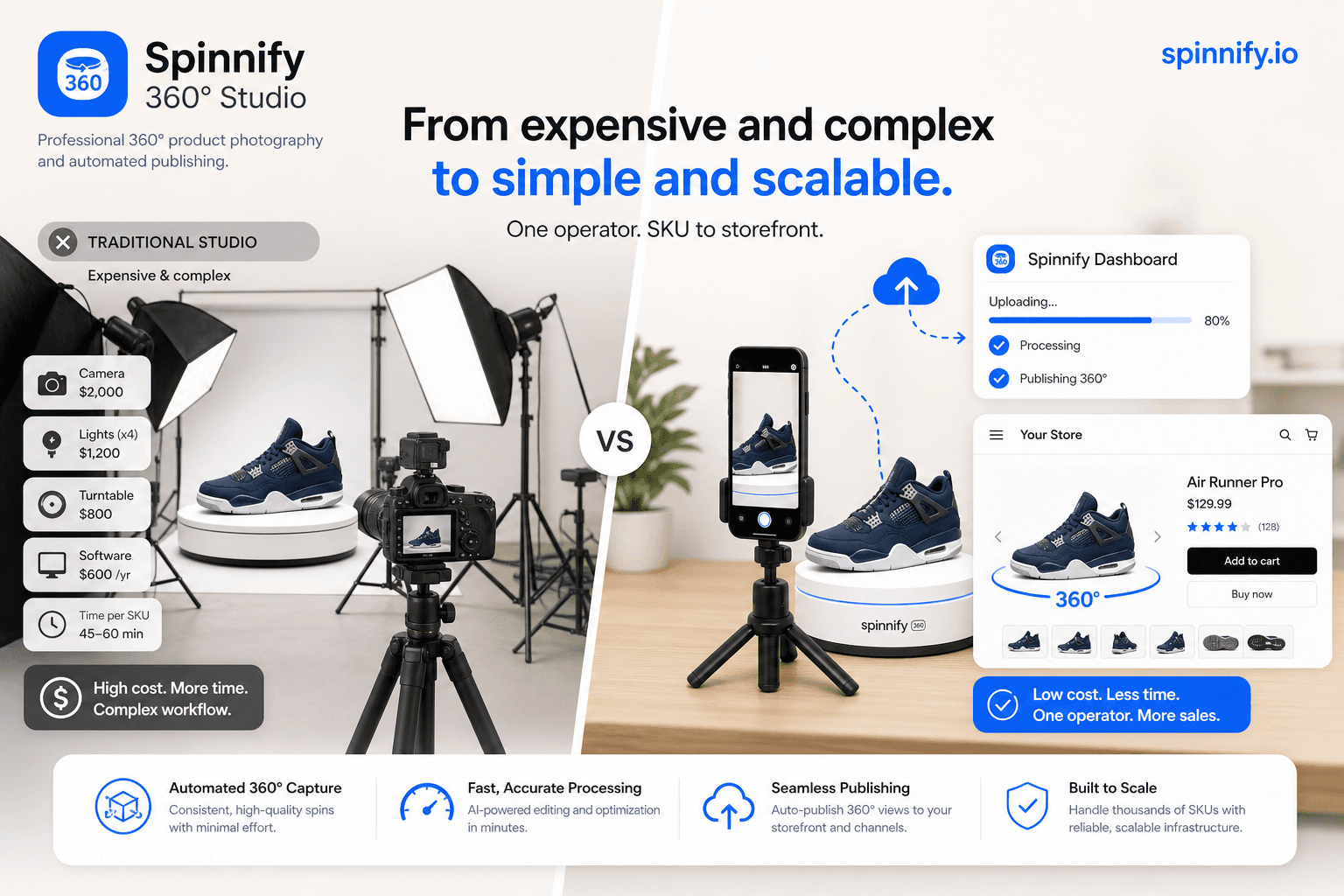
Spinnify 360° Studio is a full commerce service: capture options, cloud hosting, CDN delivery, and a storefront widget. It is not a creative agency and it does not auto-retouch frames in the cloud. You bring the shoot; the service carries it to the shopper.
In the web dashboard only, drop one short turntable video (MP4, WebM, or MOV, up to about 35 seconds and 50 MB) into the same upload zone as spin frames. Spinnify 360° Studio validates the file, extracts 36 evenly spaced frames, and uploads them to your project. Use landscape for the main 4:3 series and portrait for an optional 3:4 mobile series. Do not mix video and photos in the same drop. The mobile app captures frames or burst series; it does not upload video files. Step-by-step desk time is covered in 360° from a product video in about 2 minutes.
Start here: Open Spinnify 360° Studio.
When 360 spin video is the wrong investment
Flat garments like basic tees rarely gain much from a pure orbit; ghost mannequin or fit video usually teaches more. Tiny SKUs where rotation adds no new information waste production time. Categories that sell on lifestyle context (rooms, outfits, occasions) often need environment storytelling more than a white-background spin. Stop-motion or a short demo wins when the product opens, unfolds, or assembles.
If your only goal is a social ad, commission a polished loop and stop there. If your goal is fewer “not as pictured” returns on the PDP, budget for interactive frames or convert the loop into a viewer.
Verdict
360 spin video for ecommerce is a useful umbrella term, but the file you publish should match the job. Use autoplay loops where platforms expect video. Use interactive 360 spin images where shoppers need control and your page-speed budget is tight. Spinnify is built for the interactive path and accepts a short turntable video as the input so you are not stuck exporting frames by hand.
Next steps: upload a clip in ~2 minutes, read the warehouse 360° workflow, or compare studio alternatives in AI 360 without a photo studio.